Smartphone displaying a social media post with a caption copy option

Copy Instagram Captions from Posts and Reels

Instagram captions can be difficult to select, especially inside the mobile app. shopee save turns a public Instagram post or Reel link into clean, selectable text, so you can copy the caption without retyping it or relying on screenshots and OCR.

Use the extracted text to save quotes, organize research, collect content ideas, or prepare a credited repost. The tool works in your browser on phones, tablets, and computers and never asks for your Instagram password. Always respect the original creator and obtain permission before republishing their work.

Process

How to Copy Instagram Captions Online

You only need the URL of a public post or Reel. shopee save retrieves the available caption and keeps its hashtags, mentions, emojis, and line breaks together.

1

Copy the Link

Open the public post or Reel in Instagram, tap Share or the three-dot menu, and choose "Copy link."

2

Trigger the Search Button

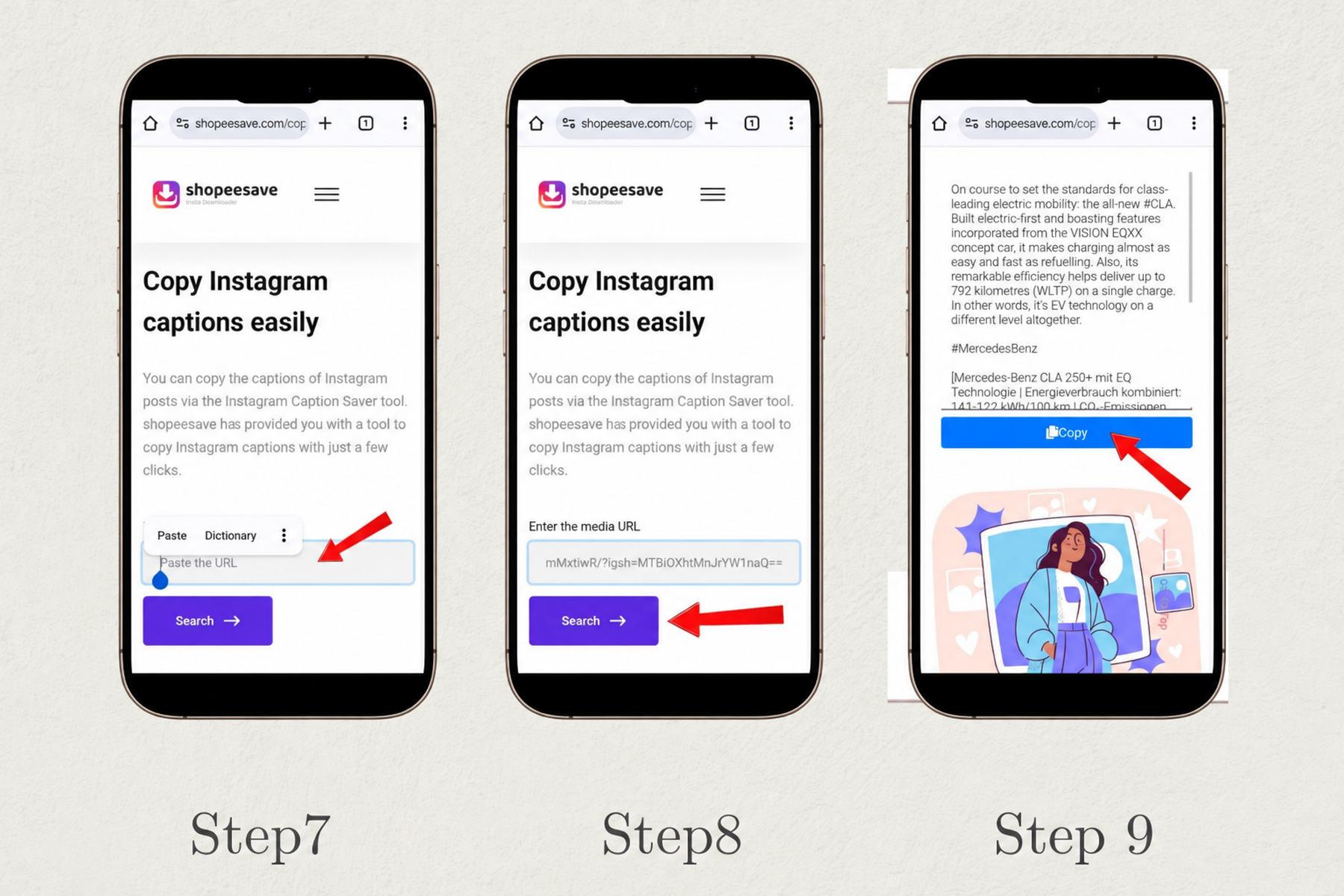
Paste the copied URL into the caption tool above, then select "Search" to process the link.

3

Copy the Caption Text

When the result appears, review the extracted text and use the copy button to save the complete caption.
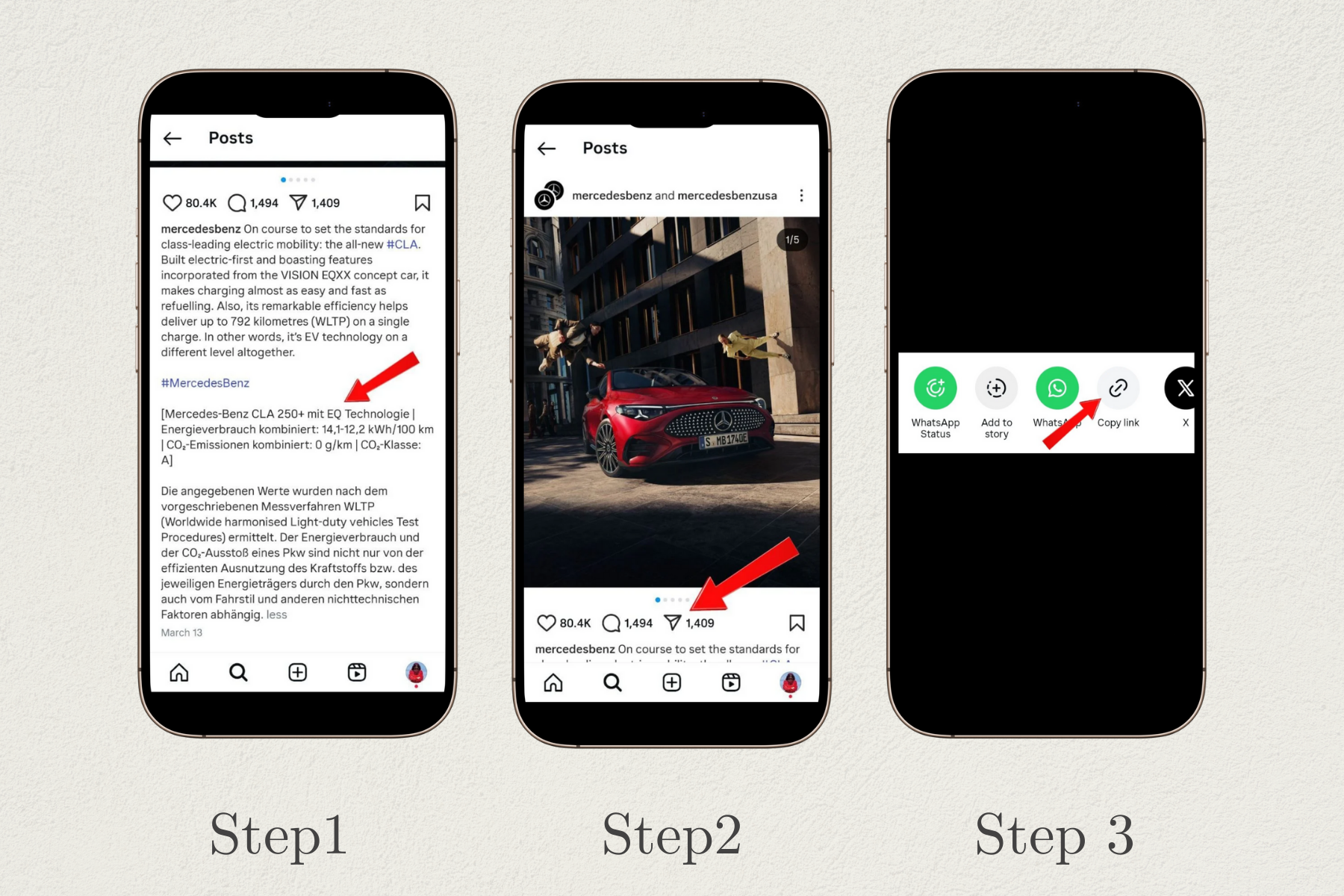
Step 1 - Copy Instagram Link
Step 1: Open a public Instagram post or Reel and copy its link.
Step 2 - Paste on shopee save
Step 2: Paste the Instagram URL into the shopee save caption tool.
Step 3 - Copy instagram Caption
Step 3: Search, review, and copy the complete caption text.

Discover How Our Web App Features Can Elevate Your Experience

A quick, browser-based way to extract caption text while preserving the details that make it useful.

Copy Caption Text

No Manual Typing

Copy captions from Instagram posts without retyping the text or using screenshots.

Compatible with Multiple Platforms

Works on Any Device

Use the caption copier on desktops, smartphones, and tablets through a modern web browser.

User-Friendly Interface

Simple for Everyone

The clean and straightforward interface makes copying captions easy for users of every skill level.

No Login Required

Keep Your Password Private

shopee save never asks for your Instagram username, password, or account connection.

Preserve Hashtags, Mentions, and Emojis

Copy the Complete Caption

Copy the available caption with its hashtags, mentions, emojis, and original line breaks together.

Works with Instagram Posts and Reels

One Tool for Popular Formats

Extract text from public photos, videos, carousels, and Reels whenever a caption is available.

Instagram Caption Saver — Frequently Asked Questions

  • How do I copy Instagram captions for free?

    Copy the URL of a public Instagram post or Reel, paste it into shopee save, select "Search," and then use the copy button beside the extracted caption.

  • Can I copy the caption from an Instagram Reel?
  • Will hashtags, mentions, emojis, and line breaks be included?
  • Is the Instagram caption copier free, and do I need to log in?
  • Can I copy captions from private Instagram accounts?
  • Does the caption copier work on phones and computers?

Subscribe to our newsletter

Go To Top